input들의 문제들

문제 1-1. 목표 무한생성

네비게이션 메뉴 클릭 시 페이지의 url은 변경되는데 단기, 장기 목표는 값이 변하지 않음.

원인

App.js에서 작업을 위해 목업 데이터 생성

1
2
3
4
5
6
7
8
9
10
11
12
13
14
15
16
17
18
19
20
21
22
23
24
25
26
27
28
const init = [
    {
        year: 2022,
        months: [
            {
                month: 1,
                goals: {
                    shortTerm: ["친구 생일선물 고르기", "맨몸운동 일주일에 세번", "캠핑용품점 방문", '캠핑 용품 청소하기'],
                    longTerm: ["캠핑 유투브 시작해보기"],
                },
                habits: [
                    { name: "영양제 챙겨먹기", completedDays: [1, 2, 3, 4, 5, 6, 7, 10, 11, 12, 13, 14, 15, 16, 20, 23, 24, 25] },
                    { name: "저널 작성", completedDays: [1, 5, 7, 8, 9, 14, 17, 30] }
                ],
                days: [
                    {
                        date: "2024-01-01",
                        todoList: [
                            { task: "운동 시작", reason: "새해 건강 목표" },
                            { task: "책 읽기", reason: "지식 향상" }
                        ],
                        journal: "새해 첫날을 활기차게 시작했다.",
                    }
                ]
            },
        ]
    },
]

단기, 장기 목표는 같은 기능을 하고 있어서 같은 컴포넌트를 사용했고, goalList라는 porps로 넘어오는 값을 기준으로 구분하고 있음.
목업 데이터에서 ‘shortTerm’과 ‘longTerm’을 사용하기 위해 아래와 같이 코드를 작성하고 수정을 위해 editGoals의 state에 보관

1
2
3
4
5
6
7
8
9
10
11
12
13
const Goals = ({ data, yearToNum, monthToNum, subTit, goalList }) => {
    const getGoals = (goalType) => data
        .filter(item => item.year === yearToNum)
        .flatMap(item => item.months
            .filter(months => months.month === monthToNum)
            .map(months => months.goals[goalType])
        ).flat();
        
    const goalType = getGoals(goalList)
    
    // 수정을 위해 필요
    const [editGoals, setEditGoals] = useState([...goalType]);
}

여기서 문제가 발생. editGoals에 담아 놓고 setEditGoals가 따로 설정이 없기 때문에 달이 바뀌어도 같은 목표가 보였던 것.

해결 1-1.

useEffect를 사용하여 생명 주기를 관리해야 한다고 생각.
의존성 배열에 무엇을 넣을지 고민하다가 goalList가 변경이 되는 것이고, 바뀐다고 생각하여서 goalList를 담고있는 goalType을 추가.

1
2
3
4
5
6
7
8
9
const goalType = getGoals(goalList)

const { onClickGoalEdit } = useContext(JournalDispatchContext);
const [isEdit, setIsEdit] = useState(false);
const [editGoals, setEditGoals] = useState([...goalType]);

useEffect(() => {
    setEditGoals([...goalType])
}, [goalType])

1초도 안된 사이에 메시지가 계속 올라가고 오류가 계속 올라감… 너무 놀랬다.
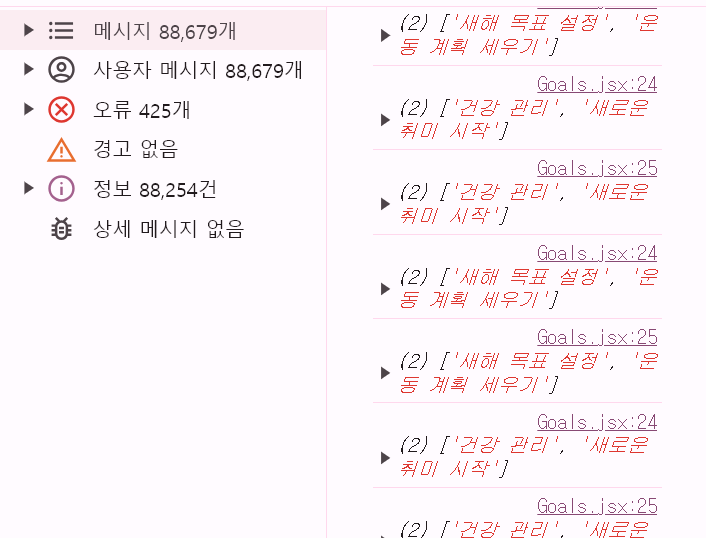
페이지가 바뀔 때 마다 랜더링하면 되는 것이기 때문에 간단하게 url 속성과 관련된 것으로 변경.

1
2
3
4
5
6
7
8
9
const goalType = getGoals(goalList)

const { onClickGoalEdit } = useContext(JournalDispatchContext);
const [isEdit, setIsEdit] = useState(false);
const [editGoals, setEditGoals] = useState([...goalType]);

useEffect(() => {
    setEditGoals([...goalType])
}, [yearToNum, monthToNum])

왜 goalType은 안될까?

goalType이 업데이트 될 때마다 useEffect가 실행됨.
초기 렌더링 시 goalType이 업데이트 되어 실행 되면 useEffect 안에 setEditGoals([…goalType])가 호출되고, 그로 인해 goalType이 또 업데이트가 되어서 무한 루프가 발생하고 불필요한 재렌더링이 발생.
그래서 오류가 상상이상으로 나오게 된 것

문제 1-2. checked 속성

checked 속성이 제일 어려웠던 것 같음.
Habit Tracker 에 날짜별로 실행한 날을 체크할 수 있는 기능이 있음.

이 부분을 어떻게 구현할지 막막했고 포기만 2번정도 했다.
먼저 목업 데이터에서 habits의 이름과 완성한 날을 변수에 담아 저장.

1
2
3
4
5
6
7
8
9
10
11
12
13
14
const Habit = ({ data, yearToNum, monthToNum }) => {
    const getHabit = (habitType) => data
        .filter(item => item.year === yearToNum)
        .flatMap(item => item.months
		        .filter(months => months.month === monthToNum)
		        .flatMap(months => months.habits.map(habit => habit[habitType]))
		    );
    
    const habitNm = getHabit('name');
    const habitComplete = getHabit('completedDays');
    
    const [editHabitNm, setEditHabitNm] = useState([...habitNm])
    const [editHabitCom, setEditHabitCom] = useState([...habitComplete])
}

매월마다 일수가 다르기 때문에 일수도 저장해 주고 그 숫자 만큼 배열로 다시 지정.

1
2
3
const endDay = [31, 30, 31, 30, 31, 30, 31, 31, 30, 31, 30, 31]
let days = endDay[monthToNum-1]
let daysArray = Array.from({ length: days }, (_, i) => i + 1);
1
2
3
4
5
6
7
8
9
10
11
12
13
{daysArray.map((day, j) => (
    <td key={j}>
        <label>
            <input
                type="checkbox"
                checked={editHabitCom[i]?.includes(day)}
                disabled={!isEdit}
                name={`day_${j}`}
            />
            <span>{day}</span>
        </label>
    </td>
))}

이 때 checked 속성을 사용하려면 onChange는 무조건 같이 사용해야함.
값이 변경이 되면 그 상태 값을 저장해야하기 때문.

1
2
3
4
5
6
7
<input
    type="checkbox"
    checked={editHabitCom[i]?.includes(day)}
    onChange={(e) => onChangeChecked(e, day, i)}
    disabled={!isEdit}
    name={`day_${j}`}
/>

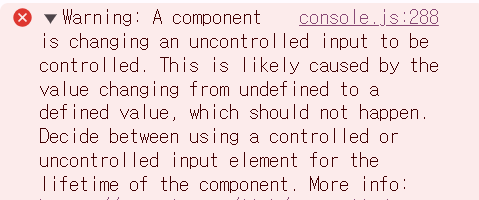
이렇게 하였으나 콘솔창에 오류가 간헐적으로 나타남.

해결 1-2.

onChange와 별개로 input 요소에 value나 checked 속성이 변할 수 있는 경우 기본값을 명확히 설정해 uncontrolled 상태가 발생하지 않도록 처리해야함.

1
2
3
4
5
6
7
<input
    type="checkbox"
    checked={editHabitCom[i]?.includes(day) || false}
    onChange={(e) => onChangeChecked(e, day, i)}
    disabled={!isEdit}
    name={`day_${j}`}
/>

논리연산자를 사용하여 왼쪽이 Falsy 한 값일 경우 오른쪽 반환하여 기본값을 설정.

문제 1-3. 해당 년도 checked를 true로 변경하기

초기 렌더링 시 페이지 진입의 년도에 맞춰 네비게이션의 년도에 checked가 true가 되어 펼쳐져 있는 상태였으면 좋겠다고 생각.

1
2
3
4
5
6
7
8
9
10
11
12
13
14
15
16
17
const Nav = () => {
    const [checkedYear, setCheckedYear] = useState(null);
    
    return (
        // ...
        {data.map((item) => (
            <li key={item.year}>
                <input
                    type="checkbox"
                    id={item.year}
                    checked={checkedYear === item.year}
                    onChange={() => setCheckedYear(item.year)}
                />
            </li>
        ))}
    )
}

이렇게 작성했을 때 기능이 원활하게 동작하지 않음.
모든 년도 하위 메뉴가 다 펼쳐졌으면 좋겠다고 생각했는데, 클릭한 것만 펼쳐지고 있음.

페이지 전환 시 useState를 URL에 있는 년도로 변경을 해도 되지 않아서 setCheckedYears에 선택한 년도의 값들을 넣기로 생각.

1
2
3
4
5
6
7
8
9
10
11
12
13
14
15
16
17
18
useEffect(() => {
    const locationYear = location.pathname.split('/')[1]?.split('_')[0];
    if (locationYear && !checkedYears.includes(locationYear)) {
        setCheckedYears([locationYear]);
    }
}, [location.pathname]);

const onCheckedYear = (year, isChecked) => {
    setCheckedYears((prev) =>
        isChecked
            ? [...prev, year]
            : prev.filter((item) => item !== year)
    );
};

const onChangeYear = (e, year) => {
    onCheckedYear(year, e.target.checked);
};

아무리해도 원하는 checked 모습을 가질 수 없었지만, 뭔가 type의 오류 일 것 같아서 확인해 본 결과 loactionYear가 String으로 들어오고 있었던 것.

1
const locationYear = parseInt(location.pathname.split('/')[1]?.split('_')[0], 10);

parseInt로 변경하여 10진수로 만들어 주었더니 원하는 결과를 가질 수 있었음.

평가

유독 input들이 많은 프로젝트였지만 너무 어려웠다. 상태 값을 설정할 땐 onChange이벤트도 신경 써야하고 name 값도 설정해줘야하고 특히나 checked 속성이 진짜 이해가 될 듯 안되는 것 같다.
더 많이 봐보고 더 많이 코드를 짜봐야 알 것 같다.